Commercial Invoice for a Shopify or Etsy Order: Step by Step
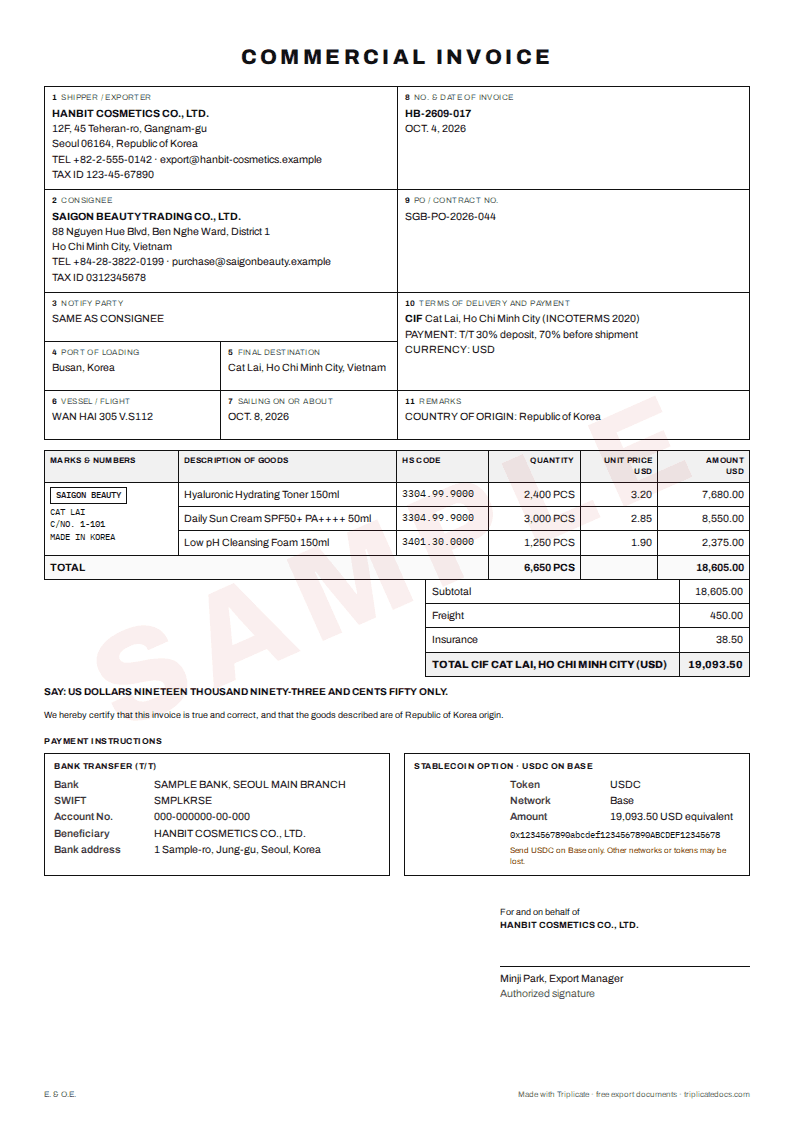
To ship a Shopify or Etsy order abroad with a commercial invoice, export the order as a CSV file and open it in an invoice generator, so the buyer, address, items, prices and shipping charged come across without retyping. Then add what the order export does not carry: the HS code and country of origin of each item, the cartons and weights, and the Incoterms rule. Read the item descriptions once more before you print: customs works from them.
Checked against official sources: 2026-10
At a glance
Open your order export in the generator →
What the order export gives you, and what it does not
Shopify's order export has columns such as Name (the order number, for example #1001), Currency, Shipping (the shipping charged), Lineitem quantity, Lineitem name, Lineitem price and Lineitem requires shipping, plus the Shipping Name, Company, Address1, Address2, City, Zip, Province, Country and Phone of the order. An order with several line items takes several rows, and most order fields are left blank on the extra rows.
The export does not include HS codes. Shopify keeps the HS code and the country of origin on each product, in the Shipping section of the product page, and uses them when you buy a label in Shopify and to estimate duties for international customers.
Etsy's Order Items file has one row per item with the item name, quantity, price, currency, the ship-to name and address and the order ID. Etsy's Orders file has one row per order and no item lines, so it cannot fill an invoice.
When you need your own commercial invoice
When you buy a label in Shopify, the HS code and origin you enter under Edit customs information can update the customs declaration form for that label. When you ship another way, for example with your own courier account, through a freight forwarder or as a wholesale order, you usually prepare the commercial invoice yourself, and a packing list when there is more than one carton. Ask the carrier or forwarder which documents and how many copies they want.
Description, value and origin: what customs reads
In the United States, 19 CFR 141.86 asks the invoice to show the seller and buyer, a detailed description of the goods, the quantities, the purchase price of each item in the currency of the sale, and the country of origin. Other countries ask for much the same core. A product title from the shop is often a marketing name; customs needs to know what the item is, what it is made of and what it is for.
- Write "ceramic coffee mug, 350 ml" rather than "Morning Mug" or "Gift".
- Show the price the buyer paid for each item, and the shipping charged on its own line, not mixed into item prices.
- Give the country where the goods were made, not the country you ship from, when they differ.
- Keep the quantities, cartons and weights the same on the invoice, the packing list and the carrier's form.
Step by step
- In Shopify, open Orders, filter to the order, click Export and export the current page. In Etsy, open Shop Manager > Settings > Options > Download Data and download the Order Items CSV for that month.
- Open the Triplicate generator, choose "Shopify or Etsy order?" above the form, open the CSV file and pick the order. The buyer, address, order number, currency, items, prices and shipping charged are filled in. The file is read in your browser and not uploaded.
- Add the HS code and country of origin of each item (in Shopify they are on the product page, not in the export), then the quantity per carton, weights and carton size.
- Choose the Incoterms rule: DAP when the buyer pays the import duties and taxes on delivery, DDP when you pay them.
- Read the checks, fix what they flag, then save the commercial invoice and packing list as PDF for the parcel or the carrier.
Documents you usually need
- Commercial invoice
- Packing list, when there is more than one carton
- The carrier's waybill or label with its customs declaration
- The order and payment record, in case customs asks for the price paid
Common problems and how to avoid them
What to do: Say what the item is, its material and use, and keep the shop name only as extra detail. Triplicate warns about one-word descriptions.
What to do: Copy them from each product's Shipping section in Shopify, or look up the heading and check it against the destination's tariff.
What to do: Leave it off the parcel's invoice. Triplicate skips Shopify lines marked as not needing shipping and tells you how many it left out.
What to do: You opened the Orders file. Download Order Items from the same page instead.
Sources
- Exporting orders Shopify Help Center
- Adding HS codes to your products Shopify Help Center
- How to Download a Spreadsheet of Your Sold Transactions Etsy Help
- 19 CFR 141.86 – Contents of invoices and general requirements Electronic Code of Federal Regulations (eCFR)
Rules change often. This note is practical guidance based on the sources above, not legal advice. Confirm current requirements with the authority, your importer or a licensed customs broker before you ship.
Weekly email: trade rule changes
One short email a week: new and changed import and export rules from official sources, plus our new guides and tools. Free, unsubscribe at any time.
Trade notes
Common questions
Does Shopify make a commercial invoice for me?
Shopify's help says the HS code and origin you enter when you buy a label in Shopify can update that label's customs declaration form. It does not describe a commercial invoice for shipments you send another way, so for those you prepare one yourself.
Can I make invoices for several orders from one file?
Yes. Pick one order to fill the form and save its documents, then the next. With Triplicate Pro, one button makes the commercial invoices for every order in the list (up to 40, the search narrows it) as one PDF, each with the order number as the invoice number.
Is my order file uploaded anywhere?
No. Triplicate reads the CSV in your browser and only fills in the form. Your documents also stay in your browser.
Which Incoterms rule should a parcel to a consumer use?
It depends on who pays the import duties and taxes. If the buyer pays them on delivery, DAP fits; if you pay them, for example because you collected them at checkout, DDP fits. Use the same rule on the invoice and with the carrier.
More free tools
Triplicate is free and keeps getting better. Found it useful? Support Triplicate ♥
Prefer no ads? Pro removes all ads · $1/month