Free packing list template
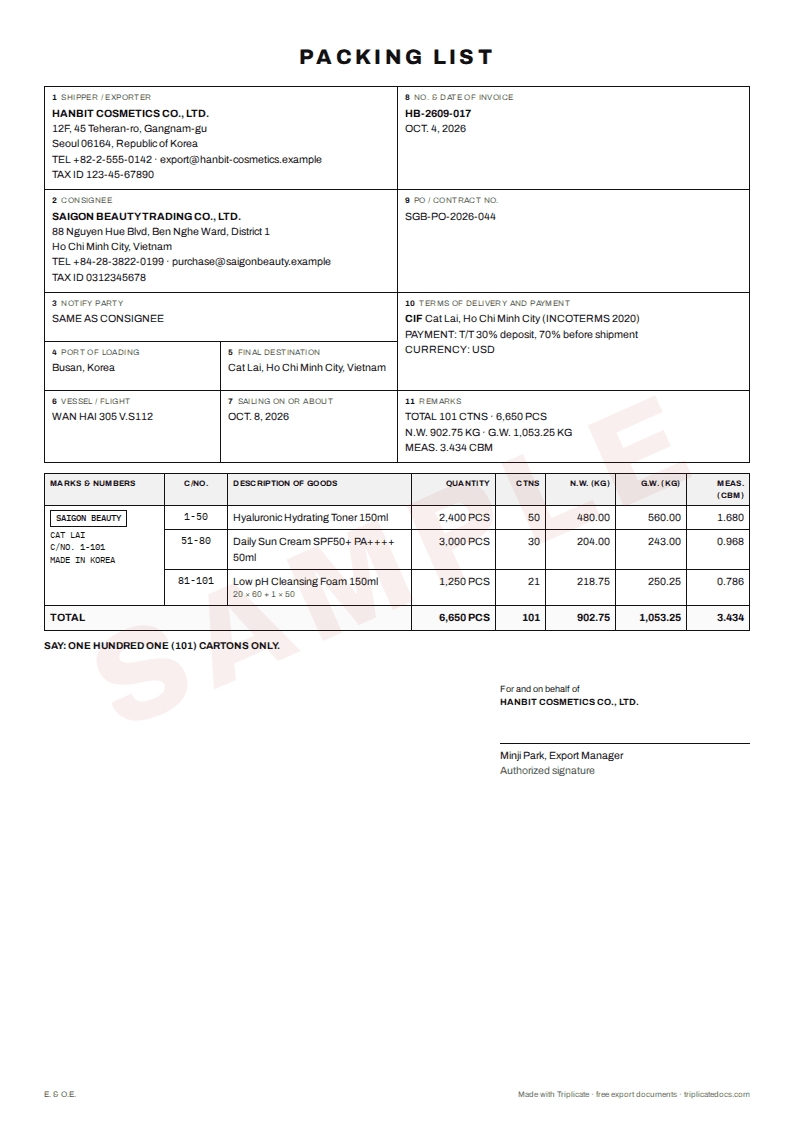
Download an export packing list in Excel: enter cartons, weights and sizes, and the totals and CBM calculate themselves. Or fill in one form online and get the commercial invoice to match.
What the template covers
- Shipper, consignee and notify party, invoice number and date
- Carton number ranges and description of goods per line
- Quantity per carton, number of cartons and total quantity
- Net and gross weight per carton and in total, carton length, width and height, and CBM with totals
Download .xlsxAll free templates →
Guides on this topic
What the packing list is for
The packing list shows what is in each package: carton numbers, contents, quantities, weights and sizes. Customs uses it to examine goods, the forwarder and carrier use it for the booking and the bill of lading, and the buyer checks the delivery against it.
How to fill it in
Give each line a carton number range (for example 1-20), the quantity per carton, net and gross weight per carton and the outer carton size. The template totals cartons, weights and CBM; use the same goods descriptions and marks as on the commercial invoice.
Common mistakes
Totals that do not match the invoice or the bill of lading, missing carton number ranges, a mixed carton counted twice, and weights rounded differently on each document. Check the gross weight against the container's verified gross mass (VGM) declaration.
Common questions
Should the packing list show prices?
Usually not. Prices belong on the commercial invoice; the packing list describes packages, contents, weights and volume.
What is the difference between net and gross weight?
Net weight is the goods alone; gross weight is the goods plus all packing such as inner boxes, cartons and pallets.
How is CBM calculated?
Length × width × height of one carton in metres, multiplied by the number of cartons. For example 60 × 40 × 30 cm is 0.072 m³ per carton.
More free tools
Triplicate is free and keeps getting better. Found it useful? Support Triplicate ♥
Prefer no ads? Pro removes all ads · $1/month